Archive

Posts Tagged ‘Bob Stovall’

Are you having enough Sales Conversations?

June 1st, 2011 No comments

“Are you having enough SALES CONVERSATIONS? If you don’t have all the business or clients that you want, maybe you simply need to have more sales conversations. That was a challenge I laid down to my Marketing Mastermind group last month, and one couple jumped to action with IMMEDIATE results.”

That bit of advice came to me from Bernadette Doyle of ClientMagnets.com.

Although Bernadette was talking about direct face-to-face selling of services, I couldn’t help but think how it applies to what we do. When a local business posts an update to their blog, comments on Facebook or Twitter or sends an email update to their list, they are having a “sales conversation” with their market even if they aren’t overtly selling.

That’s because all of us like to do business with those we know, like and trust. The process of relationship building is helped along each time we do one of those things.

But to work really well, these things have to be done consistently. Tony Robbins puts it this way: “It’s not what we do once in a while that shapes our lives, but what we do consistently.” It can shape our lives and it can shape our businesses.

One of the great things about marketing online is that your target audience needs to do something to respond to your message – if you are doing it right. The act of taking action means they will most likely pay closer attention to your message than they will using passive media.

So if you’re not as busy as you’d like to be, or if you’re not making as many sales as you’d like, think about what you can do to have more sales conversions, either face-to-face or using your online marketing strategy.

Start taking advantage of this strategy today and you’ll see results in no time.

There’s a great book named Social Networking for Business that can get you on the right track for using Social Media to start more Sales Conversations.

This post originally appeared on BobStovall.com on Memorial Day 2009.

QR Code Makes Paper (and other) Promotions Interactive
May 25th, 2011 No comments

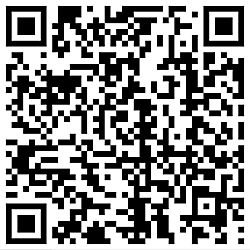
QR Code links to sample real estate listing

QR Code links to sample real estate listing - click to enlarge

Just when you think you know everything about marketing Manufactured Housing online, technological advancement proves you wrong.

One of the best things about the web is its interactivity. Hot linking, audio, video and scripting can provide your website visitors with a rich experience and provide you with a world class marketing tool. Email and social networking can further enrich the experience and provide your visitors with more entry points to your website – the heart of your online marketing strategy.

What if you could have a way to make your offline assets – your business card, brochures, magazine ads, post cards, clothing, bumper stickers etc. – interactive as well? What if someone could click a link on your business card and be taken to a special offer on your website? What if an after hours visitor to your place of business could visit your website by clicking a link on your front door? What if a potential buyer could click a link on a home you have for sale and immediately get all of the info on the home?

Well, I don’t think you’ll be actually clicking on links on these objects anytime soon, there is something almost as good that can do all the things we cited above… plus much more.

It’s called a QR (Quick Response) Code and it’s picking up momentum as a way to make almost anything interactive. You may have seen one already. They pop up in magazine ads, museum exhibits, tourism brochures and many other places. If you have a smartphone and a reader app for QR Codes, you can scan them and get more information, contact info, photographs, web pages, Facebook pages, coupons, special deals, etc.

Here is an image of my business card with a QR Code on the reverse side that leads to my consulting website:

Now my business card does double duty. It provides the holder with the usual contact information – the same as any other business card – and it provides a direct link to my website. Go ahead and test it if you have a smartphone. If you need a QR Code reader, check your phone’s App Store – there are sure to be several you can choose from.

QR Code usage is in its infancy as we write this. They are primarily used by early adopters. But the potential for marketing with QR Codes is unlimited. This is a technology that you may want to have a good look at. It’s easy and inexpensive to use. It’s about to become one of those high ROI marketing techniques that will make late adopters wish they had moved on earlier.

Need help putting new technologies into action? Contact or call Bob at 859.755.4115.

It’s Manufactured Housing photo time

May 22nd, 2011 2 comments

HowDoIDoThatVideos.com logoManufactured Home and Land Lease Community operators and owners, and retailers take note: if you’ve been waiting for the right time to photograph those installations, properties and communities, now would be the time.

In many parts of the country, you’ll need to wait out the rain to get a clear day to photograph those homes and communities, but it will be worth the wait.

Be sure to get plenty of photos when the sun shines so you’ll have a lot to choose from when you post them to your website or Facebook fan page.

You may need to re-size or enhance your photos before uploading them to your website. There are a few tools that I’ve used to do this that will cost you absolutely nothing to use.

If you have Mac, your computer came with iPhoto. iPhoto makes the job of adjusting, enhancing and resizing your photos a snap.

But if you’re using a Windows or Linux powered machine, there are a couple of tools here that can help you get the job done in style.

First, there’s the Open Source application the GIMP, that runs on Linux, Mac or Windows. the GIMP can do pretty much anything that Photoshop can do – but saves you the $700 that Photoshop costs. There are installers for each. The Mac version requires that the X11 X-Window system be installed. It is installed on OS X 10.5 Leopard and newer by default. the GIMP for Linux and Windows can be downloaded at GIMP.org.

Here’s a video showing how the get started with the GIMP:

Although it’s free, the GIMP has a learning curve like any other sophisticated software. The video above is from a 23 video tutorial set that can get you using the GIMP like a professional in just a few hours and provides ongoing support for as long as you need it.

The video tutorial set is called Create Stunning Graphics Using the GIMP and is available at HowDoIDoThatVideos.com.

If all you need to do is resize images, PixResizer for Windows will do the trick. You can download it from bluefive.pair.com/pixresizer.htm Here’s a short video on how to use it:

The long and short of this is get out there now through June to get the best images you’re going to get. So go get them, then use one of these tools to enhance them or resize them and put them to work for you.

How to Register for Podcasts and Premium Content

May 18th, 2011 1 comment

To make it even easier to register for our News at Noon podcasts, Industry in Focus Reports and other premium content, I’ve created this video to show how to register step-by-step.

The biggest obstacle to a smooth registration has been the confirmation step. After submitting your registration, the system sends you an email with a confirmation link in it. You MUST click the link to complete the registration process and be able to login.

The confirmation step is often missed when the email ends up in the registrant’s “junk” or “spam” folder, so always check there if you don’t receive your confirmation email swiftly (within a half-hour).

But the best way to ensure that you receive the email is to “whitelist” the mhmsm.com domain in your email program. Often, all you need to do is add “update@mhmsm.com” to your address book.

Here are some specific instructions for whitelisting a domain for some common email programs.

Google GMail

Whitelist a Sender or Domain in Gmail

To make sure Gmail never filters as spam mail from a certain contact or domain:

Follow the Settings link in Gmail.

Go to Filters.

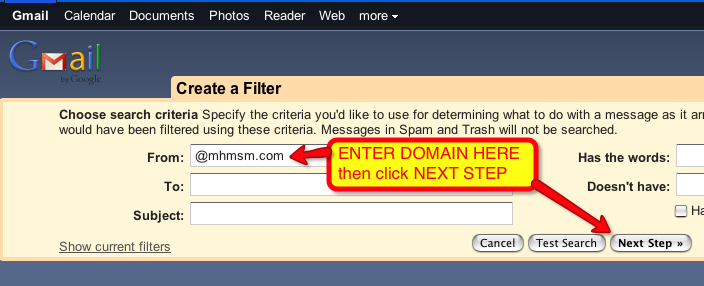
Whitelisting an Email Domain in Gmail, Page 1

Click Create a new filter.

Type the desired email address under From:
To whitelist an entire domain (all mail from an address ending in “mhmsm.com”, for example), type the just the domain name or the domain name preceded by ‘@’. To whitelist “mhmsm.com”, for instance, type “@mhmsm.com” (not including the quotation marks).

Click “Next Step »”
You can click Test Search before, of course, to make sure you did not mistype.

Whitelisting an Email Domain in Gmail, Page 2

Make sure “Never send it to Spam” is checked.

Click Create Filter.

Mozilla Thunderbird

Add “update@mhmsm.com” to your Address Book

Outlook

Click the “Tools” pull-own in the main menu and select “Options.”

Whitelisting an Email Domain in Outlook, Page 1

Click the “Junk E-mail…” button and select the “Safe Senders” tab

Whitelisting an Email Domain in Outlook, Page 2

Enter “mhmsm.com” into the “Add Address or Domain” pop-up box, then click “OK” and click “OK” again.

Whitelisting an Email Domain in Outlook, Page 3

In the event your registration fails or if you don’t receive your confirmation email, please start a ticket at MHMSM Support and we’ll get you fixed up ASAP.

Access files from any computer with Dropbox

May 14th, 2011 No comments

Dropbox logoI recently published a post at BobStovall.com that linked to a blog post on how to use Dropbox to backup your WordPress installation. That’s a valuable tip for any WordPress user, but here are some other ways I use Dropbox.

When I’m traveling and presenting a workshop on the road, I always carry a copy of the presentation on my MacBook and a USB Thumb Drive. Now, I also drop a copy of the presentation into my Dropbox before I leave. That way even if the worst happens, I can still easily access my presentation from any computer anywhere in world that has an Internet connection.

Using the Dropbox App on my iPhone (works on Android, too), I upload pictures taken with the phone to my Dropbox. That way they are accessible on my desktop in my office or from either laptop I carry away from the office.

I also keep a password-protected file with vital information in my Dropbox in case I run into problems while away from home.

2GB of Dropbox storage is free. If you signup for Dropbox using this link, both you and I will get an additional 250mb of storage free.

Linux | Mac | Windows – Download Dropbox Here

Use the comments box below to tell us if you’ve found a unique way of using Dropbox.